Sequential Read: From read() to the Disk, and Why Postgres Sometimes Picks Seq Scan Over Your Index
In the deep dive on the B-tree index, we concluded: when a query has to fetch most of a table’s rows, the query planner ignores the index and picks a Seq Scan — scanning the whole table — because reading sequentially is far cheaper than hopping along ctid pointers to thousands of scattered pages. It sounds reasonable, and you accepted it as a given.
Then one day: the same query, the same orders table, EXPLAIN estimates the Seq Scan at roughly that cost — but EXPLAIN ANALYZE shows the actual time is five times that number. The cost model didn’t change, the row count didn’t change, nobody is locking the table. So what changed?
The answer isn’t in SQL — it’s in the layers beneath it, where an operation that’s “sequential on paper” can degrade into “random on the platter.” And to get down there, we have to answer a handful of questions most backend developers “know but aren’t quite sure about”:
- Is a “Seq Scan” in the query plan really a sequential read at the disk level?
- Does a single
read()read one page or many? - Does a heap file “made of consecutive pages” actually sit consecutively on the disk?
Most of the fuzziness comes from collapsing the layers into one. This post pulls them apart, tracing the whole chain from the spinning platter up to the query executor, with PostgreSQL as the lens. It stands on the shoulders of Storage Internals (heap file, 8 KB page, shared buffer) and B-tree Index (random I/O, seq_page_cost/random_page_cost) — wherever we need a foundational concept, we link back rather than re-explain.
And because most of the latency gap between “sequential” and “random” is born in the physics of a spinning disk, we start with the disk itself.
1. Anatomy of an HDD — where the latency really comes from
The whole “sequential is faster than random” story — the thing that drives the planner’s choice — originates in the mechanics of a spinning hard disk drive (HDD). On a database whose data sits on an HDD, this gap is everything. So before discussing any I/O pattern, let’s agree on the physical vocabulary.
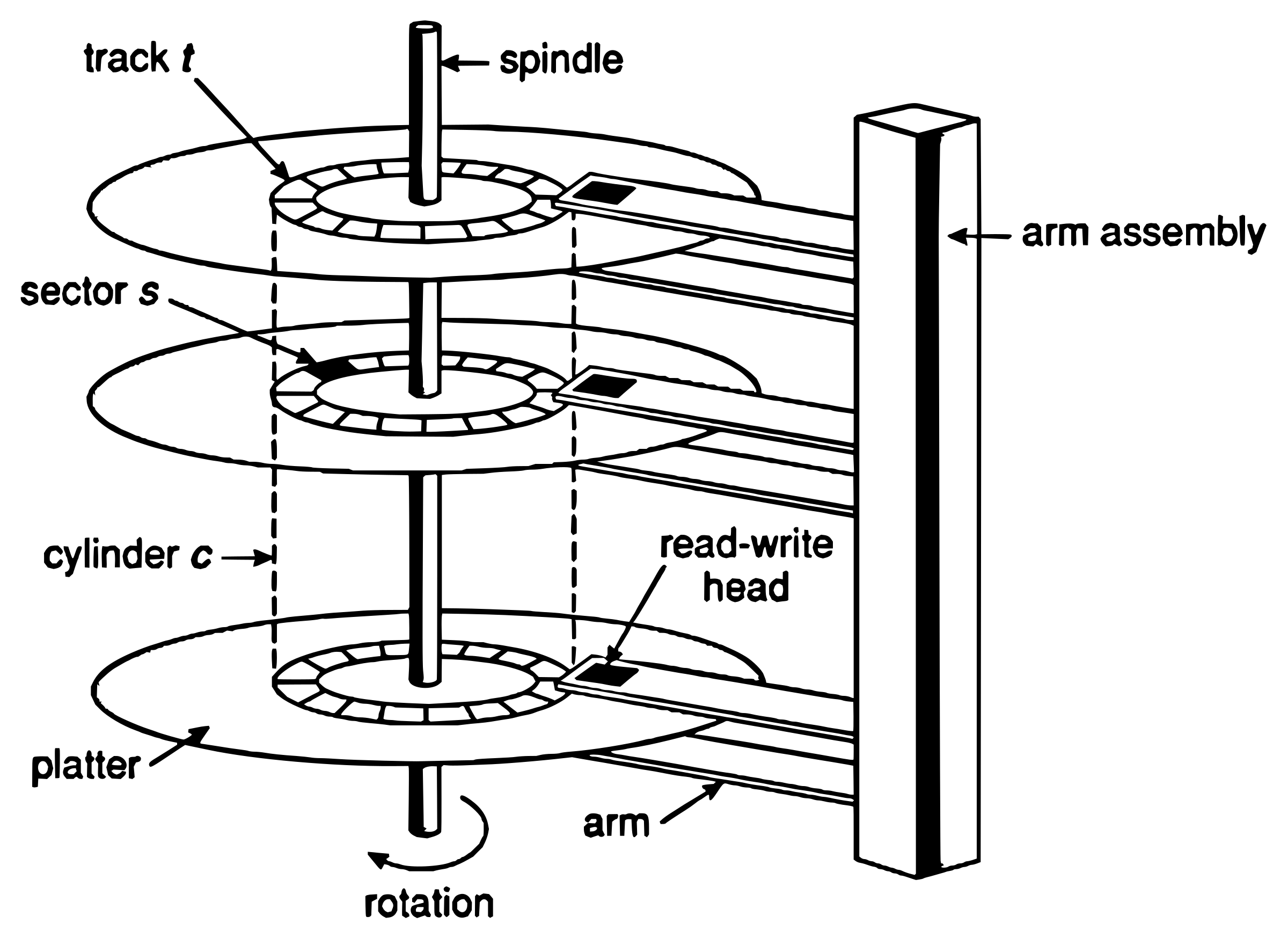 Physical anatomy of an HDD with platter, track, sector, actuator arm and read/write head
An HDD consists of platters (magnetic disks) stacked on a spindle, spinning at a fixed speed measured in RPM (revolutions per minute — commonly 7,200 or 15,000). Each platter surface is divided into tracks (concentric rings), and each track into sectors. The set of the same track across every platter is called a cylinder. And to read data, an actuator arm carries the read/write heads — all heads fixed to the same arm and moving together.
The cost of one read has three components:
- Seek time — the time to move the arm so the head reaches the target track. This is the most expensive mechanical operation, averaging ~5–10 ms (good server drives ~4 ms, desktop drives ~9 ms).
- Rotational latency — once the head is on the right track, it still has to wait for the target sector to rotate under the head. On average half a rotation: at 7,200 RPM, one rotation takes 8.33 ms → on average ~4.2 ms.
- Transfer time — the time to actually stream the bytes once positioned. For 8 KB, this is nearly zero.
This is the crux that powers the whole article. For a random 8 KB read, seek + rotational latency dominate (~10 ms), while the transfer itself is negligible — you pay ~10 ms to fetch 8 KB. For a sequential read, the head is already in place, so adjacent sectors “stream” under it continuously; that fixed cost is paid once and then amortized across a long run of data. The result: an HDD reaches ~150 MB/s reading sequentially, but with small-block random reads it manages only about 75–150 IOPS — i.e. a few hundred KB/s. A gap of roughly ~100×.
Keep this ~100× number in mind: it’s exactly what the query planner is estimating when it weighs Seq Scan against Index Scan.
And a parenthetical note for later: SSD has none of this — no arm, no rotation. We’ll come back in section 6 to see why, on SSD, that gap nearly vanishes.
2. From a table to sectors on a platter
Most of us picture a table from the logical angle: from Storage Internals, a table is a heap file, and a heap file is just a sequence of 8 KB pages at consecutive offsets — page 0 at byte 0, page 1 at byte 8192, page 2 at byte 16384… “Data is a file made of consecutive pages.” True, but that’s only half of it: an offset in a file is not a location on the disk.
Between “a page in the heap file” and “a sector on the platter” sit two mapping layers:
- Heap file → filesystem extent → LBA. The heap file is really a file on the filesystem. The filesystem places the file’s byte ranges into physical blocks, grouped into extents. On a fresh or freshly-defragmented filesystem, the whole file fits in one large extent → consecutive pages get consecutive LBAs. But as the table grows and free space fragments, the file is torn into many extents scattered far apart.
- LBA → physical address. The disk’s firmware maps each LBA to a concrete location (cylinder, track, sector). Consecutive LBAs ≈ adjacent sectors.
This is the hinge of the whole article:
Consecutive pages in a heap file are usually adjacent sectors on the platter — but only because the filesystem happened to lay them out contiguously; nothing in the “heap file” itself guarantees it.
This single fact explains both sides: why a logical seq scan is normally fast (section 3), and why it can collapse into physical random I/O when the mapping breaks (section 6).
PostgreSQL adds one wrinkle here: once a heap file hits a size limit, it is split into segment files (relfilenode, relfilenode.1, relfilenode.2… — see Storage Internals). Even the boundaries between segments are separate filesystem objects, which can perfectly well land in different extents on the disk.
3. Two I/O patterns: sequential vs random
Now we have the vocabulary to define the two patterns precisely. Sequential read and random read classify the I/O pattern at the storage layer — that is, the order of positions in which we request data, not what we read or why.
- Sequential read: reading adjacent blocks/pages in increasing address order — block N, N+1, N+2, …
- Random read: jumping to discrete, hard-to-predict positions — block 10, then 4732, then 88, then 2901.
A common point of confusion: suppose a table has 50 pages and we need to read from page 10 to page 20. This is a sequential read, even though we skipped pages 1–9. What matters isn’t “reading from the start of the file” but that the 11 pages we need are adjacent and accessed in order. Starting from the middle of the file doesn’t make it random.
Laid over the mechanics of section 1, the difference is stark:
- With random, every read pays a seek + rotational latency (~10 ms).
- With sequential, the head stays put on the track and adjacent sectors stream by continuously, sharply reducing seek + rotational latency.
Naming the layers clearly — and answering the opening question
This is where the most easily-confused conceptual knot gets untangled, and it’s the direct answer to the question from the introduction:
- A Seq Scan in a query plan is an access method at the executor layer — it says what to read, and by what method.
- A sequential read is an I/O pattern at the storage layer — it says in what order the disk is accessed.
A Seq Scan is usually realized as a sequential read — which is exactly why a Seq Scan beats an Index Scan when a query needs to read most of the table. But the two concepts don’t always coincide: a fragmented heap file turns a Seq Scan into physical random reads (section 6), and sequential reads also occur outside a Seq Scan — for example, an index range scan reading adjacent B-tree leaf pages is also a sequential read.
And recall the mapping from section 2: a logically sequential read is only physically sequential when the heap file’s pages map to adjacent sectors. When they don’t, “sequential” degrades into random — which we’ll dissect in the final section.
4. How much does a read() actually read? Untangling the syscall
A very common assumption: “the database reads one page at a time, one read() per page.” This is both true and false, depending on which layer you look at. To untangle it, we need to separate three different numbers that often get lumped into one.
How much read() requests. The syscall signature is:
ssize_t read(int fd, void *buf, size_t count);read() reads at most count bytes. count is decided by the application — there’s no “one page per call” constraint at all. If the database passes a count equal to the size of 16 pages, a single read() requests 16 pages. This is exactly multi-block read. So “one page per read()” is a design choice, not a law.
How much the OS actually touches the disk. This is the most important separation: the bytes read() requests ≠ the bytes the OS reads from disk. You read() 1 page, but if read-ahead (section 5) is running, the OS may load 16 pages into the page cache. Or you read() 1 page but that page is already in the page cache → the OS never touches the disk, just copies from cache into your buffer. read() describes the application’s intent; how much the disk is actually accessed is decided by the kernel’s cache + read-ahead.
The physical I/O unit. At the bottom, the disk and kernel work in blocks (typically 4 KB) or sectors (512 B). The OS always reads in multiples of a block — it can’t read half a block. An 8 KB database page corresponds to two 4 KB blocks. When you read() 100 bytes, the kernel still loads the whole block containing those 100 bytes.
These three numbers are independent of one another, and conflating them is the root of the “does read() read one page?” question.
What PostgreSQL does
PostgreSQL reads heap and index data in units of 8 KB blocks. Classically, it issued one block at a time via pread(), and relied on the OS’s read-ahead to turn that stream of discrete 8 KB reads into efficient I/O during a sequential scan. For many years, that really was the whole story — “Postgres always reads exactly one 8 KB block, even during a seq scan”.
That has changed. PostgreSQL 17 added the read stream API and the io_combine_limit parameter: for sequential scans (and ANALYZE, plus a few others), Postgres now coalesces several adjacent 8 KB blocks into one larger read — up to 128 KB by default instead of 8 KB. This is exactly the multi-block read concept above, implemented inside the database:
SHOW io_combine_limit; -- 128kB (PostgreSQL 17+)PostgreSQL 18 goes one step further: true asynchronous I/O, controlled by io_method (default worker, using background processes; or io_uring on Linux). For sequential scans, bitmap heap scans, and VACUUM, AIO lets disk reads overlap with data processing, delivering 2–3× improvements — especially visible on network-attached storage like EBS, where every I/O wait is a network round-trip.
The key to untangling “the database only reads one page”: at the logical layer, the executor consumes data one page at a time — true. But at the I/O layer, loading the data isn’t necessarily page-by-page: it can be a multi-block read, or several asynchronous read requests overlapping each other. Those are different numbers.
5. Read-ahead in the kernel
Read-ahead (prefetch at the OS layer) is the mechanism by which the kernel proactively loads blocks it predicts the application will soon need, before read() for those blocks is even called. The goal: hide I/O latency. By the time the application gets to reading the next block, the data is already in the page cache, and read() returns instantly without waiting on the disk.
Pattern detection. The kernel tracks the sequence of read()s per file descriptor. Seeing offsets rising steadily and adjacently (N, N+1, N+2…), it concludes this is sequential access and turns read-ahead on. Seeing offsets jump around, it narrows or disables read-ahead — because predicting ahead would be wrong, and prefetching the wrong thing only wastes disk bandwidth and RAM cache.
The adaptive window. The kernel maintains a read-ahead “window” of dynamically changing size: when it first suspects sequential access, it prefetches a small amount; each time its prediction is correct (the application really does read into the pre-loaded blocks), the kernel grows the window — reading further ahead next time; when the pattern breaks, the window shrinks or resets to 0. The more clearly sequential the workload, the harder the kernel prefetches; a random workload makes read-ahead nearly disappear.
Linux implements this with the idea of a readahead marker. When the application reads into the marked block, that’s the signal for the kernel to launch the next prefetch batch — asynchronously, running in parallel while the application is still processing the data it already has. This way, loading from disk and the application’s computation overlap:
- The application
read()s block 0; it’s a cache miss, so the kernel reads block 0, simultaneously prefetches blocks 1–15 into the page cache, and marks block 12. - The application reads blocks 1, 2, 3…; these were already prefetched and are sitting in the OS page cache, so they return immediately, with no trip to disk.
- Reaching the marked block (block 12), the kernel decides to prefetch the next batch, blocks 16–47.
Ideally: the application never has to stop and wait on the disk.
6. When the assumption breaks: a seq scan still seeks
By now we have a neat chain: a seq scan → reading sequentially by the heap file’s offsets → physical sequential read → leveraging read-ahead → fast. But that’s the ideal case.
A seq scan reduces seeks; it does not eliminate them.
There are still many sources of seeks even when you’re “reading sequentially”:
- Filesystem fragmentation — as in section 2: a heap file can be spread across many extents. A logically sequential read still produces a physical seek every time it jumps between extents.
- Remapped sectors — a bad sector relocated by the controller to a spare area causes an unexpected seek even when the LBAs are adjacent.
- Interleaved I/O from other processes — the disk serves many queries at once. While your seq scan is reading page 100, another query cuts in to read a different region of the disk → the head is dragged away → when it comes back for your page 101 it has to seek back. Your “sequential” read is shredded by concurrent load.
- Auxiliary structures — sometimes a scan has to touch structures located elsewhere (the free space map, the visibility map — see Storage Internals), not adjacent to the main heap region.
Why a heap file’s pages get scattered
Continuing from section 2, three sources cause logically-adjacent pages to sit scattered physically:
- Filesystem fragmentation. As the table grows, the filesystem allocates extents from whatever free space it has; if free space is fragmented, the extents of the same heap file end up scattered everywhere.
- A heap has no storage order. A “heap” by definition is unordered — a row goes into whatever page has room.
- Updates/deletes and space reuse. When a row is deleted or updated, the page frees space that gets reused via the free space map; later inserts land in those scattered free pages instead of appending at the end of the file. Over time, rows written close in time end up dispersed in location. (The dead-tuple/MVCC mechanism is dissected in the Table Bloat post.)
This is why maintenance operations exist: CLUSTER physically reorders a table’s pages by an index, turning random into sequential — but for a plain heap (Postgres’s default) it’s a one-shot operation, not self-maintaining, and the table gradually “drifts” back toward scattered (see B-tree index section 5); while VACUUM cleans up and compacts to reduce fragmentation.
CLUSTER orders USING idx_orders_created_at;Why the cost model uses expected values
This is also why PostgreSQL’s cost model uses expected values rather than absolutes:
SHOW seq_page_cost;      -- 1
SHOW random_page_cost;   -- 4
PostgreSQL doesn’t set seq_page_cost = 0; it sets it = 1.0 — meaning a seq scan still has a per-page cost, just a cheaper one. The 1.0 instead of 0 is precisely the acknowledgment that sequential reads are neither free nor seek-free; they’re just considerably cheaper under typical conditions. random_page_cost = 4.0 (not 40, even though the hardware gap reaches 100×) because the cost model assumes ~90% of random reads hit the cache — it models “random is ~40× slower, but 90% is cached”. On SSD, people often tune random_page_cost down to 1.1–2.0 because the seq/random gap narrows.
And this is the resolution to the story from the introduction: when a heap file is heavily fragmented, a seq scan that’s “sequential on paper” produces physical random I/O and runs far slower than the planner’s estimated cost. EXPLAIN ANALYZE shows the actual time diverging from the estimated cost — and the cause lives at the filesystem/disk layer, not the query-plan layer.
Finally, on SSD this whole seek discussion fades: there’s no mechanical head, no physical movement, so the seq/random difference is just a small overhead in IOPS and parallelism — no longer a few mechanical milliseconds per jump. Most of the “pain” of random I/O in this article is the story of a spinning disk.
Conclusion
The chain from disk to query plan can be reduced to one principle: each layer makes its own decision based on its own information. The disk works in blocks and “likes” sequential access. The kernel watches the offset pattern and guesses whether to read ahead. PostgreSQL issues reads in 8 KB pages (sometimes coalesced into larger reads) and relies on the OS’s read-ahead. And the query executor, at the top, picks Seq Scan or Index Scan based on its estimate of how many pages must be read and the cost of each kind of read.
Keeping the layers separate is the key to reading a query plan correctly. Summarized by the question each layer answers:
| Concept | Layer | Answers the question |
|---|---|---|
| Sequential scan | Query executor | What to read, by what method? |
| Multi-block read | Database I/O layer | How does the database issue reads? |
| Read-ahead | Kernel / OS | How does the OS guess ahead and fill the cache? |
| Sequential read | Storage / disk | In what pattern is the disk accessed? |
The core takeaways:
- The seq/random gap is born in HDD physics. A random read pays seek + rotational latency (~10 ms); a sequential read amortizes them once and then streams (~150 MB/s). That’s ~100×, and on SSD it nearly vanishes.
- An offset in a file is not a location on the disk. Adjacent pages in a heap file are usually adjacent sectors — but only because the filesystem happened to lay them out contiguously; nothing guarantees it.
read()reads exactly the number of bytes you tell it to — while how much the disk is touched (cache + read-ahead) and the fact that the device works in whole blocks are three independent numbers.- A Seq Scan (access method) is usually realized as a sequential read (I/O pattern) — but the two concepts live at different layers and can diverge.
- A seq scan reduces seeks but doesn’t eliminate them. Fragmentation, remapped sectors, and interleaved I/O all turn a “sequential” scan into seeks — which is why
seq_page_cost = 1.0, not 0.
When optimizing, don’t mix the layers: a “slow” query might be because the planner picked the wrong access method, because the datafile is fragmented, or because the kernel’s read-ahead is misconfigured — each cause lives at a different layer, and knowing which one is half the way to fixing it.