AWS Security & Encryption: A Map of KMS, Secrets, ACM, WAF, Shield, GuardDuty and How to Pick the Right Service
You just shipped a fintech app to AWS. A week later, the security team comes in for a review and leaves behind a list of questions that make you sweat:
- “Is customer data in S3 and RDS encrypted? Who holds the encryption keys, how are they rotated, and who is allowed to use them?”
- “Where do your database passwords and API keys live? Don’t tell me they’re hardcoded or sitting in environment variables. Do they rotate automatically?”
- “How does your public endpoint defend against SQL injection and DDoS? What happens if it gets hit with a 100 Gbps flood?”
- “And most importantly: if right now an instance got hijacked to mine crypto, or an S3 bucket were leaking customer ID numbers, would you even know?”
Four questions, four completely different problems — and AWS has no single service that solves all four. Instead there is a whole family of services, each born to plug a specific gap: encryption and key management, secrets storage, edge defense, and threat detection.
This is also the SAA exam’s favorite trap: it gives you a scenario (“need encryption but must control the keys in dedicated hardware,” “need to auto-rotate an RDS password,” “need to find PII in S3”) then offers four options that all sound reasonable, and you must pick exactly one. The boundary between services is what’s really being tested.
This post is the map that helps you tell them apart. For each service we’ll walk through: what problem it solves, its core features, real-world use cases, and the points the exam loves to probe.
Note: This is an overview meant to build a mental model and let you recognize services quickly in the exam room. Each service here (especially KMS and WAF) deserves its own deep-dive; this post focuses on the boundaries between them and why each one exists.
1. The big picture: 4 defense groups
Before the details, pin this mental framework. Every service in the Security & Encryption space falls into four groups, each answering a different question:
| Group | The question it answers | Key services |
|---|---|---|
| Encryption & key management | ”How do I encrypt data and manage keys?” | KMS, CloudHSM |
| Secrets & certificates | ”Where do I store secrets and issue TLS certificates?” | SSM Parameter Store, Secrets Manager, ACM |
| Edge defense | ”How do I block web exploits and DDoS?” | WAF, Shield, Firewall Manager |
| Threat detection | ”How do I know I’m being attacked / leaking data?” | GuardDuty, Inspector, Macie |
There’s one more distinction worth drawing, because the exam leans on it heavily:
- Preventive: stop bad things from happening — encryption, WAF blocking a request, IAM limiting permissions.
- Detective: detect bad things that have happened or are happening — GuardDuty, Inspector, Macie. They don’t block; they alert.
Keep this framework in mind, and let’s walk through each group.
2. Encryption 101: three types of encryption to tell apart
Before talking about services, you need the fundamentals: data can be attacked at two moments — while it is in transit over the network, and while it is at rest on disk. There are three corresponding types of encryption, each answering the question “who holds the key, who does the encrypting.”
Encryption in flight protects data on the wire between client and server. Data is encrypted before it leaves the sender and only decrypted after it reaches the receiver, so an eavesdropper in the middle (a MITM attack) only sees meaningless bytes. This is exactly TLS/SSL, the thing behind HTTPS. The key lives in the TLS certificate — and this is where ACM comes in (section 6).
Server-side encryption at rest protects data sitting on disk. The server receives the raw data, encrypts it itself before writing to disk, and decrypts it before returning it to the client. The key is managed by the server — on AWS that’s usually KMS. This is the mechanism behind SSE-S3, SSE-KMS, EBS volume encryption, and RDS encryption. The crucial point: the server does see the raw data at processing time.
Client-side encryption is the opposite: the client encrypts the data before sending it, and the server never sees the raw data — it only stores the ciphertext. The client manages the key (possibly with KMS via envelope encryption). Use it when you don’t trust even the storage side, or when you need end-to-end encrypted data.
3. AWS KMS — the heart of encryption on AWS
AWS Key Management Service (KMS) is the service for managing encryption keys, and it is built into nearly every AWS service that needs at-rest encryption (S3, EBS, RDS, DynamoDB, Secrets Manager, and more).
Instead of creating and safeguarding keys yourself, KMS holds them in a tightly controlled system, lets you grant and revoke key usage through IAM, and records every use of a key in CloudTrail for auditing.
3.1. Key types and ownership
KMS has two key types by algorithm:
- Symmetric: a single key (AES-256) used for both encryption and decryption. The key never leaves KMS in plaintext — you must call the KMS API to use it. This is the default type, used by most AWS services.
- Asymmetric: a public/private key pair (RSA or ECC). The public key can be downloaded to encrypt or verify signatures outside AWS; the private key stays in KMS. Use it when the caller cannot call the KMS API (for example, encrypting from outside AWS), or for sign/verify operations.
Key Policies are an easy trap. Every KMS key has a resource-based policy attached directly to it, and no one can access the key unless the policy allows it — not even the root account. There are two flavors:
- Default key policy: grants the account full control and delegates permission management to IAM (like other resources).
- Custom key policy: you explicitly list which users/roles may use the key — required for cross-account key sharing.
3.2. Master key, data key, the 4 KB limit, and envelope encryption
A core limit: a direct KMS Encrypt/Decrypt API call processes at most 4 KB of data. So how do you encrypt a 1 GB file? To answer that, you need the concept of a data key and KMS’s two-tier key model.
- KMS key (master key) is the root key that never leaves KMS. It does not directly encrypt your data; its main job is to encrypt and decrypt the Data Encryption Keys.
- Data Encryption Key (data key) is a key KMS generates on demand to encrypt the actual data. This is the key that works directly with your data, and it is itself protected (encrypted) by the KMS key.
The mechanism that combines these two tiers is called envelope encryption: the data sits inside an “envelope” locked by the data key, and the data key sits inside a larger “envelope” locked by the KMS key. This technique shows up constantly on the exam.
The envelope encryption flow:
GenerateDataKeyreturns two things: the data key in plaintext for you to use right away, and that same data key in encrypted form, encrypted by the KMS key (called the encrypted data key).- You use the plaintext data key to encrypt the large block of data right on your own machine (no network round trip, no 4 KB limit), then wipe the plaintext data key from memory as soon as possible.
- You store the encrypted data key alongside the ciphertext. To decrypt, call
Decryptand send the encrypted data key to KMS to get the plaintext data key back, then decrypt the data yourself.
Point to remember: when the exam mentions data larger than 4 KB, think immediately of envelope encryption / GenerateDataKey.
So why separate the master key from the data key at all? It’s a deliberate design. Part of the answer is offloading the heavy encrypt/decrypt workload onto the client. Encrypting or decrypting a large object is expensive, and the data key approach lets that encryption/decryption happen on the client instead of inside KMS.
3.3. Key rotation, region scoping, and throttling
Key rotation means periodically replacing a key to limit the damage if a key is exposed:
- AWS Managed Keys: rotate automatically once a year, with no intervention from you.
- Customer Managed Keys: automatic rotation is optional. Since April 2024, AWS lets you configure a flexible period from 90 days to 2560 days (default 365 days) and even rotate on demand at any time.
- Imported keys: cannot rotate automatically; you must do it manually.
A subtle and frequently asked point: why does old data still decrypt after a key is rotated?
When KMS rotates a key, it generates a new backing key but keeps all the old backing keys around. Most importantly: the Key ID and ARN do not change — same shell, new contents. Every ciphertext (or every encrypted data key) carries metadata recording which backing key version encrypted it. On decryption, KMS reads that metadata and automatically picks the matching backing key:
- Old data: decrypted with the old backing key.
- New data: encrypted with the new backing key.
Key rotation does not re-encrypt old data. Old data stays encrypted under the old backing key until you actively re-encrypt it (for example with the ReEncrypt API). And because your application only references the key by its unchanged Key ID, the whole process is transparent — you don’t change any code or configuration.
A KMS key is a regional resource — a key cannot leave its region (the exception is Multi-Region Keys). When you copy an encrypted snapshot to another region, you must re-encrypt it with a key in the destination region.
KMS has a per-second request limit. When exceeded, the API returns ThrottlingException — handle it with exponential backoff (retry with growing delays) or request a quota increase. This is the classic cause of failures in S3 replication or bulk encryption batch jobs.
3.4. Multi-Region Keys
By default a KMS key is limited to a single region.
Multi-Region Keys break that: a set of identical KMS keys that AWS replicates across multiple regions, sharing the same Key ID and backing key. There is one primary key and one or more replica keys.
Thanks to this, you can encrypt data in region A and decrypt it in region B without a cross-region call or re-encryption — because the keys on both sides are the same.
Note that these keys are managed independently (each has its own key policy) even though they share the same backing key.
Multi-Region Keys are not a default choice — most data should stay in a single region. Use Multi-Region Keys only when you genuinely have a multi-region need, because each key in each region is billed separately.
3.5. S3 Replication with encrypted data
S3 Replication is an asynchronous, automatic, one-way copy mechanism from a source bucket to one or more destination buckets, driven by object changes tracked through S3 Versioning rather than periodic scanning.
Whenever an object is created or modified, S3 produces a new version, and that version becomes a “unit of work” in an internal replication queue. S3 uses an IAM role you specify in the replication rule to read objects from the source and write them to the destination on your behalf — meaning the permission to replicate is separate from the uploader’s permissions, and for cross-account replication the destination bucket policy must allow that role to write.
When you enable S3 Replication, replicating encrypted objects has a few easy-to-forget rules:
- Unencrypted objects and SSE-S3 objects are replicated by default.
- SSE-C objects (customer-provided keys): supported.
- SSE-KMS objects: must be enabled explicitly in the replication configuration. You need to specify the KMS key in the destination region, and grant the replication IAM role
kms:Decrypton the source key pluskms:Encrypton the destination key. Because each object is one KMS call, bulk replication can easily hit the KMS throttling ceiling — in which case you request a quota increase.
3.6. Sharing an encrypted AMI with another account
To understand sharing an AMI across accounts, you first need to know what an AMI (Amazon Machine Image — the template for launching an EC2 instance) actually is.
An AMI has three parts: metadata (name, CPU architecture, and so on), launch permission (who is allowed to use this AMI to launch an instance), and BlockDeviceMappings (which EBS volumes the AMI references).
When you build an AMI from an instance via create-image, AWS does two things: it takes a snapshot of each EBS volume attached to the instance, then writes an AMI record pointing at those snapshots. Launching reverses this — AWS restores brand-new volumes, fully independent of the originals, from those snapshots.
An AMI’s storage cost is really the cost of storing its snapshots; the other parts are negligible. And because the snapshots are what sit behind it, deleting an AMI does not delete its snapshots — deleting an AMI often leaves the snapshots behind, still accruing charges.
Because an AMI is a region-scoped resource, “sharing an AMI” comes in two flavors that differ sharply in cost and lifecycle:
- Grant launch permission — add the target’s account ID, organization ID, or OU ID to the AMI’s launch permission (
modify-image-attribute --launch-permission). The AMI stays in the source account, the source keeps paying for storage, and if the source deletes the AMI the target can no longer launch from it. This is “let them use it,” not “let them own it.” - Copy to the target account — the target runs
copy-imageto produce a brand-new AMI it owns and whose lifecycle it fully controls. This requires the source to grant two things: launch permission on the AMI, andcreateVolumePermissionon each snapshot behind it. The snapshot grant is the most-forgotten step — without it the target can see the AMI but the copy will fail.
Since a copy is really a read of the snapshots, the first step is to find the snapshots behind the AMI:
aws ec2 describe-images --image-ids ami-0abc123 \
  --query 'Images[0].BlockDeviceMappings[*].Ebs.SnapshotId'
Then grant read access on each snapshot to the target account — the step people most often miss:
aws ec2 modify-snapshot-attribute --snapshot-id snap-0aaa111 \
  --attribute createVolumePermission --operation-type add \
  --user-ids 222233334444
When the AMI is encrypted, a few key constraints kick in. You cannot share a snapshot encrypted with the default AWS-managed key (aws/ebs) — the source must first copy its own AMI to a Customer Managed Key and share that version instead. You also need to add a statement to the CMK’s key policy allowing the target account the kms:DescribeKey, kms:Decrypt, and kms:CreateGrant actions on the key. Without the KMS permissions, even a shared snapshot cannot be decrypted for the copy.
Finally, when copying, the target should re-encrypt with its own key right there to cut any future dependency on the source’s key:
aws ec2 copy-image \
  --source-region us-east-1 --source-image-id ami-0abc123 \
  --region us-east-1 --name "app-base-v1.2" \
  --encrypted --kms-key-id <target-account-CMK>
This ties back to the region-scope property from section 3.3: because a KMS key cannot leave its region, sharing an encrypted AMI across regions is likewise a copy-image that re-encrypts with the destination region’s key.
4. AWS CloudHSM — when you need full hardware control
With KMS, AWS manages the software that generates and stores keys (even though you control the policy). But some organizations (banks, governments) have stricter compliance requirements: the keys must live in dedicated hardware that AWS cannot touch. That’s why AWS CloudHSM exists.
CloudHSM provides single-tenant HSMs (reserved for you, not shared), meeting the FIPS 140-2 Level 3 standard. AWS only provisions and maintains the hardware; you manage the keys and users yourself — AWS has no access to your keys.
Things to remember:
- Supports both symmetric and asymmetric keys, and is a good fit for SSE-C (since you hold the keys yourself).
- Keys are accessed through industry-standard libraries: PKCS#11, JCE, CNG — not the AWS API. IAM here is only for managing the HSM cluster lifecycle, not for using keys.
- Deployed as a multi-AZ cluster for high availability (HA).
- Custom Key Store: KMS can use your CloudHSM cluster as its key store — you get the convenience of the KMS API while the physical keys live in your own HSM.
A quick KMS vs CloudHSM comparison — a classic SAA question:
| Criterion | AWS KMS | AWS CloudHSM |
|---|---|---|
| Tenancy | Multi-tenant (shared) | Single-tenant (dedicated) |
| Who controls the keys | AWS manages, you control via IAM/policy | Entirely you; AWS has no access |
| Type | Managed software service | Dedicated hardware device |
| Access | AWS API + IAM | PKCS#11 / JCE / CNG |
| Standard | FIPS 140-2 Level 3 (some HSMs) | FIPS 140-2 Level 3 |
| When to use | Default for encryption on AWS | Compliance requires a dedicated HSM, you must hold the keys |
Exam rule of thumb: see “dedicated HSM,” “FIPS 140-2 Level 3,” “must control the keys yourself, AWS may not touch them” → CloudHSM. Otherwise, the default is KMS.
5. Secrets & config: SSM Parameter Store vs Secrets Manager
The security team’s second question — “where do the DB passwords and API keys live” — is solved by two services. Both store encrypted values, but they were built for slightly different purposes.
5.1. SSM Parameter Store
AWS Systems Manager Parameter Store is a hierarchical store for configuration data and secrets. You store values as plain text or SecureString (encrypted with KMS), organized along a path tree like /my-app/prod/db-url.
But there’s a crucial point most exam-takers miss — and it’s the key to ending the hesitation when a question offers both Parameter Store and Secrets Manager: Parameter Store is not a standalone secrets service. It’s a component inside AWS Systems Manager — the same house as Run Command, Automation, Session Manager, and Patch Manager. It exists so those operational tools have somewhere to read parameters from: when an Automation document or Run Command needs to know “which AMI” or “which config,” it reads from Parameter Store. In other words, Parameter Store was born from the needs of the SSM operations suite, not from a need to manage secrets. The fact that it can also store secrets (via SecureString) is a secondary feature, not its reason for existence.
The practical exam takeaway: when the scenario leans toward real secrets management — automatic rotation, database credentials, the lifecycle of a secret — then even though Parameter Store “can store it,” the correct design choice is still Secrets Manager. Parameter Store fits operational config and simple, rarely-changing secrets.
Core features:
- Hierarchy + path-based permissions: grant IAM access to a whole branch like
/my-app/prod/*. - Versioning, auditing via CloudTrail, notifications via EventBridge.
- Can reference Secrets Manager secrets (via the
/aws/reference/secretsmanager/...path) and AWS public parameters (for example, fetching the latest Amazon Linux AMI ID). - Two tiers:
| Tier | Parameter count | Value size | Parameter policies | Cost |
|---|---|---|---|---|
| Standard | 10,000 / account / region | up to 4 KB | No | Free |
| Advanced | 100,000 | up to 8 KB | Yes (TTL/expiration) | $0.05 / param / month |
Point to remember: Parameter Store has no built-in automatic rotation — to rotate, you build it yourself with Lambda + EventBridge.
5.2. AWS Secrets Manager
AWS Secrets Manager is a purpose-built service for secrets, created to fill exactly what Parameter Store lacks: automatic rotation. This is the biggest differentiator.
Core features:
- Automatic secret rotation on a schedule, executed by a Lambda function. In particular, it has native integration with RDS, Aurora, Redshift, and DocumentDB — Secrets Manager can generate and rotate database credentials for you with no code.
- Mandatory KMS encryption (there’s no “leave it unencrypted” option like Parameter Store).
- Multi-region secrets: replicate secrets to other regions (for DR and multi-region apps).
- Dynamic reference integration in CloudFormation, App Runner, ECS, and more.
The trade-off is cost: roughly $0.40/secret/month plus API charges — noticeably more than Parameter Store standard (free).
6. AWS Certificate Manager (ACM) — TLS/SSL certificates
Back to encryption in flight from section 2: to run your site over HTTPS you need a TLS/SSL certificate. Buying, installing, and remembering to renew it every year is painful. AWS Certificate Manager (ACM) automates the whole thing: provisioning, managing, and deploying certificates.
Core features:
- Free public certificates — you only pay for the resources (ELB, CloudFront, etc.), not the cert.
- Automatic renewal for ACM-issued certificates (a big plus — no more outages from a forgotten renewal).
- Supports importing third-party certificates, but imported certs do not auto-renew.
- Two domain-ownership validation methods: DNS validation (recommended — enables automatic renewal) and email validation.
- Private CA (ACM Private CA): issues internal certificates for private systems (paid).
Two gotchas the exam loves:
- ACM integrates with ELB (ALB/NLB/CLB), CloudFront, and API Gateway — but cannot be attached directly to EC2, because you can’t export the private key of a public cert. To run HTTPS on EC2 you must use a self-managed cert or sit behind a load balancer.
- ACM is a regional service. For CloudFront, the certificate must live in us-east-1 (N. Virginia) — one of the most-asked region gotchas.
7. Edge defense: WAF, Shield, Firewall Manager
The third question — blocking web exploits and DDoS — belongs to three services that work together, each as a layer.
7.1. AWS WAF — application-layer firewall (Layer 7)
AWS WAF (Web Application Firewall) filters HTTP/HTTPS traffic at Layer 7 to block common web exploits: SQL injection, XSS, and bad bots.
You attach WAF to: Application Load Balancer, API Gateway, CloudFront, AppSync (GraphQL), Cognito User Pool, App Runner.
Note: it cannot be attached to a Network Load Balancer (NLB is Layer 4 and doesn’t understand HTTP).
It’s configured through a Web ACL containing rules:
- IP set: block/allow by IP list.
- HTTP content-matching rules: by header, body, URI, query string.
- Size constraints, geo-match (block by country).
- Managed rule groups: prebuilt rule sets from AWS and partners on the Marketplace.
- Rate-based rules: limit the number of requests per IP over a time window — this is the mechanism for Layer 7 DDoS protection.
A Web ACL is regional, except when attached to CloudFront, where it’s global (at the edge).
A classic architecture gotcha: you need WAF but also need a static IP. Since WAF can’t attach to an NLB (which provides static IPs), the solution is to put the ALB behind AWS Global Accelerator (which provides 2 static anycast IPs) and attach WAF to the ALB.
7.2. AWS Shield — DDoS protection
DDoS is an attack that overwhelms a system with a massive flood of traffic from many sources. AWS defends against DDoS via Shield, in two tiers:
- Shield Standard: free, automatically on for every AWS customer. Protects against common Layer 3/4 attacks (SYN flood, UDP flood, reflection). Nothing to do.
- Shield Advanced: paid, $3,000/month per organization (plus data transfer). Advanced protection for EC2, ELB, CloudFront, Global Accelerator, and Route 53, plus:
- 24/7 DDoS response team (SRT).
- DDoS cost protection: refunds the cost spikes caused by your system auto-scaling to absorb an attack.
- Automatic application-layer DDoS mitigation: auto-creates WAF rules (WAF is included free for protected resources).
- Real-time metrics and visibility.
7.3. AWS Firewall Manager — centralized org-wide management
AWS Firewall Manager solves the scale problem: when you have dozens of accounts in an AWS Organization, how do you apply the same set of security rules across all of them without configuring each account by hand?
Firewall Manager lets you define centralized policies that manage: WAF rules (Web ACL), Shield Advanced, Security Groups, AWS Network Firewall (filtering traffic at the VPC level), and Route 53 Resolver DNS Firewall.
Its biggest strength: rules are automatically applied to new resources the moment they’re created across the entire organization → continuous compliance, with no account left behind.
Telling the three apart — a question that comes up often. The core idea: WAF, Shield, and Firewall Manager are used together for comprehensive protection, but each answers a different need. The decision framework:
- Defining rules is always WAF’s job. The set of Web ACL rules is always declared in WAF, no matter what you use to manage them afterward.
- Need granular protection for a few resources → WAF is enough and correct. When you just need Layer 7 request filtering for a handful of resources, WAF on its own is the right choice.
- Need to use WAF across accounts, accelerate configuration, automatically protect new resources → Firewall Manager (+ WAF). Firewall Manager doesn’t replace WAF; it manages and applies WAF rules at organization scale and auto-attaches them to new resources as they appear.
- Prone to DDoS, need extra premium features → Shield Advanced. Shield Advanced sits on top of WAF: dedicated SRT support, advanced reporting, cost protection, and automatic application-layer DDoS mitigation. If you get hit by DDoS frequently, this is worth buying.
The one-line mnemonic: WAF = granular rules on a resource; Firewall Manager = apply WAF/Shield across many accounts & automate it; Shield Advanced = a premium DDoS layer stacked on top of WAF.
7.4. DDoS protection best practices
AWS publishes a whitepaper on DDoS resiliency that bundles its recommendations into numbered best practices (BP1, BP2, …) and layers them onto a reference architecture. The recurring theme: block attacks as close to the edge as possible, before they ever reach the core infrastructure in the VPC.
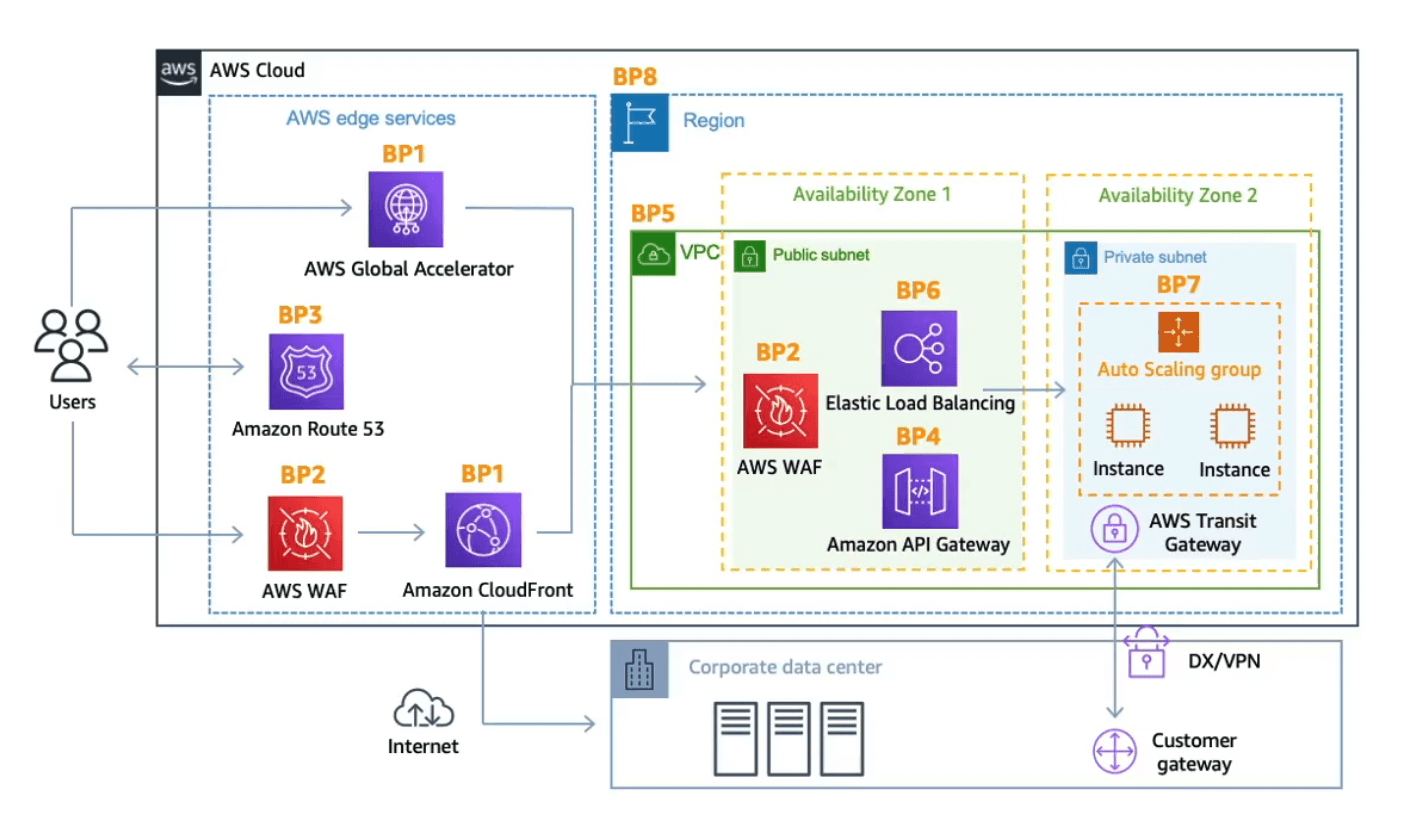 AWS DDoS reference architecture absorbing attacks at the edge before they reach the VPC
Read the architecture above in layers: user traffic enters through the edge services (Global Accelerator, Route 53, WAF, CloudFront) — where most of the attack is absorbed — and only then reaches the VPC holding the ELB, API Gateway, and the compute tier (Auto Scaling group) inside the subnets. A few core principles the exam likes to ask about:
- Mitigate at the edge: push traffic through CloudFront, Global Accelerator, and Route 53 to absorb and disperse attacks right at the edge locations, before they reach the origin. Global Accelerator is also handy when your backend isn’t compatible with CloudFront, and it integrates with Shield.
- Be ready to scale to absorb: use Auto Scaling and CloudFront/Global Accelerator to “swallow” attack traffic instead of collapsing under it.
- Application-layer defense: WAF with rate-based rules, geo-match, and managed rules; CloudFront caching to offload the origin; API Gateway throttling.
- Reduce the attack surface: hide the origin (only allow CloudFront to reach it via a Security Group + custom header), use tight Security Groups/NACLs, and protect your API endpoints.
8. Threat detection & sensitive data: GuardDuty, Inspector, Macie
The fourth question — “how do I know I’m being attacked or leaking data” — belongs to the detective group. These three services don’t block attacks; they detect and alert. Telling these three apart is one of the questions you can count on appearing.
8.1. Amazon GuardDuty — threat detection
Amazon GuardDuty is an intelligent threat-detection service that uses machine learning, anomaly detection, and threat intelligence to find malicious activity.
The big advantage: it’s a one-click enable, no agents to install.
It analyzes existing log sources:
- CloudTrail logs (management events + S3 data events).
- VPC Flow Logs (network traffic).
- DNS query logs.
- Optional extensions: EKS audit logs, RDS/Aurora login activity, Lambda network activity, S3, and malware scanning on EBS volumes.
When it detects an anomaly, GuardDuty generates a finding and pushes it through EventBridge so you can respond automatically (invoke Lambda, send SNS). It catches threats like: an instance hijacked to mine cryptocurrency (cryptomining), reconnaissance behavior, anomalous API calls, and IAM credential exfiltration.
A recent addition (December 2024): GuardDuty Extended Threat Detection automatically correlates multiple signals into a multi-stage attack sequence (for example: credential compromise → followed by data exfiltration) and rolls them up into a single critical-severity finding — free for every GuardDuty customer.
Memory hook: see “analyze VPC Flow Logs / DNS logs / CloudTrail to detect anomalous behavior” or “stop crypto mining” → GuardDuty.
8.2. Amazon Inspector — vulnerability management
Amazon Inspector automates vulnerability management — scanning your workloads for known security vulnerabilities. It works with only three resource types:
- EC2 instances: scans for software vulnerabilities (matching the CVE database) and network reachability, via the SSM agent.
- Container images in ECR: scanned when the image is pushed.
- Lambda functions: scans for vulnerabilities in code and dependencies.
Inspector scans continuously, assigns a risk score to each vulnerability, and sends findings to Security Hub and EventBridge.
Burn this in: Inspector only covers EC2, ECR, Lambda — it does not touch data in S3.
Memory hook: see “CVE,” “software vulnerability,” “scan container images,” “vulnerability” → Inspector.
8.3. Amazon Macie — protecting sensitive data
Amazon Macie is a data security and privacy service that uses machine learning and pattern matching to discover and protect sensitive data in S3. Specifically, it scans your S3 buckets and flags PII — personally identifiable information — then alerts via EventBridge.
Use case: complying with privacy regulations (GDPR, PCI-DSS, etc.), answering the question “which buckets is my customers’ PII scattered across?”.
Memory hook: see “PII,” “sensitive data,” “S3,” “privacy” → Macie.